 Call Us : 08045813037Call Us : 08045813037
 English
 Spanish
 French
 German
 Italian
 Chinese (Simplified)
 Japanese
 Korean
 Arabic
 Portuguese

 Send Inquiry
Entrust Sigma Full Panel Ribbon
Price 3500.00 INR/ Piece
MOQ : 1 Piece
Entrust Sigma Full Panel Ribbon Specification
- Size
- 250 Images
- Material
- ribbon
- Color
- Yellow, Magenta, Cyan, Black
- Pattern
- Plain
- Feature
- good
- Gender
- Man & Women
Entrust Sigma Full Panel Ribbon Trade Information
- Minimum Order Quantity
- 1 Piece
- Supply Ability
- 5000 Pieces Per Month
- Delivery Time
- 7 Days
About Entrust Sigma Full Panel Ribbon
Product details
| Minimum Order Quantity | 1 Piece |
| Description | YMCKO |
| Origin | US |
| Part Type | Cartridge |
| Material | Resin |
| Quality | OEM (Original Equipment Manufacturer) parts |
Specification
| Ribbon Cartridge | The ribbon cartridge holds a replaceable print ribbon. |
| Print Ribbon | The print ribbon is used to apply images to the card. |
| Cleaning Roller | The replaceable cleaning roller removes dust and other particles from the cards as they move into the printer. |
| Cleaning Roller Retainer | Pull up on the retainer to load the cleaning roller on the print ribbon cartridge and secure it in position. |
| Cleaning Roller Retainer | Use the handle to remove the ribbon cartridge from the printer. |
Versatile Color Printing
The Sigma Full Panel Ribbon provides full spectrum color options with Yellow, Magenta, Cyan, and Black, ensuring every image is vivid and accurate. It is suitable for various printing requirements, from ID cards to graphic designs, making it a preferred choice for professionals.
High-Quality Material Composition
Consisting of resin and ribbon materials, the Entrust Sigma Ribbon delivers excellent durability and consistent results. Its robust build withstands prolonged use, enabling crisp and clear images for up to 250 prints per ribbon.
FAQ's of Entrust Sigma Full Panel Ribbon:
Q: How is the Entrust Sigma Full Panel Ribbon used for printing?
A: The Sigma Full Panel Ribbon is installed in compatible printers, enabling vibrant color printing with its Yellow, Magenta, Cyan, and Black panels. It is suitable for producing high-quality images on cards, badges, and similar media.Q: What materials are used in the construction of the Sigma Full Panel Ribbon?
A: This ribbon combines resin and conventional ribbon components, ensuring durability and exceptional print clarity. The materials used support consistent performance for professional printing needs.Q: When should you replace the Entrust Sigma Full Panel Ribbon?
A: It is recommended to replace the ribbon after printing approximately 250 images, as that is the maximum capacity. Replace sooner if you notice decreased print quality or faded colors.Q: Where can I purchase the Entrust Sigma Full Panel Ribbon in India?
A: You can procure the ribbon from authorized exporters, suppliers, or traders throughout India. These trusted vendors ensure product authenticity and quality for industrial or office use.Q: What is the proper process for installing this ribbon into a printer?
A: Ensure your printer is compatible with the Sigma Full Panel Ribbon. Open the ribbon compartment, insert the ribbon as per the manufacturer's instructions, and secure it properly before initiating the printing process.Q: How does the Sigma Full Panel Ribbon benefit printing tasks?
A: Offering up to 250 prints per ribbon with sharp colors and plain panel consistency, this product elevates the quality of printed images while optimizing efficiency for business and personal use.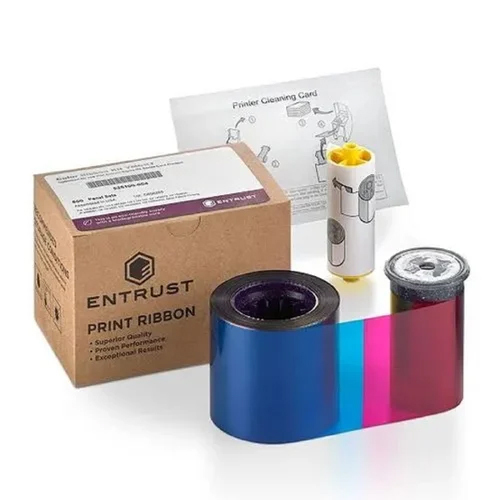
Tell us about your requirement

Price:
Quantity
Select Unit
- 50
- 100
- 200
- 250
- 500
- 1000+
Additional detail
Mobile number
Email


Address
DUKINFO SYSTEMS PRIVATE LIMITED
GST : 19AAFCD7956C1ZG
GST : 19AAFCD7956C1ZG
- Deepalaya House, 5/51 Jagatipota, Near Tata Motors Service Centre, Kishan Market, Kolkata - 700152, West Bengal, India
- Phone :08045813037
- Send Inquiry
 Send Inquiry
 Send Inquiry
 Send SMS
 |
DUKINFO SYSTEMS PRIVATE LIMITED
All Rights Reserved.(Terms of Use) Developed and Managed by Infocom Network Private Limited. |
